Interceptors
RESTHeartInterceptors play a crucial role in the RESTHeart framework, allowing developers to observe and modify requests and responses throughout the request lifecycle. This document provides an overview of the Interceptor class, available interceptor interfaces, and usage examples.
Request Lifecycle Overview
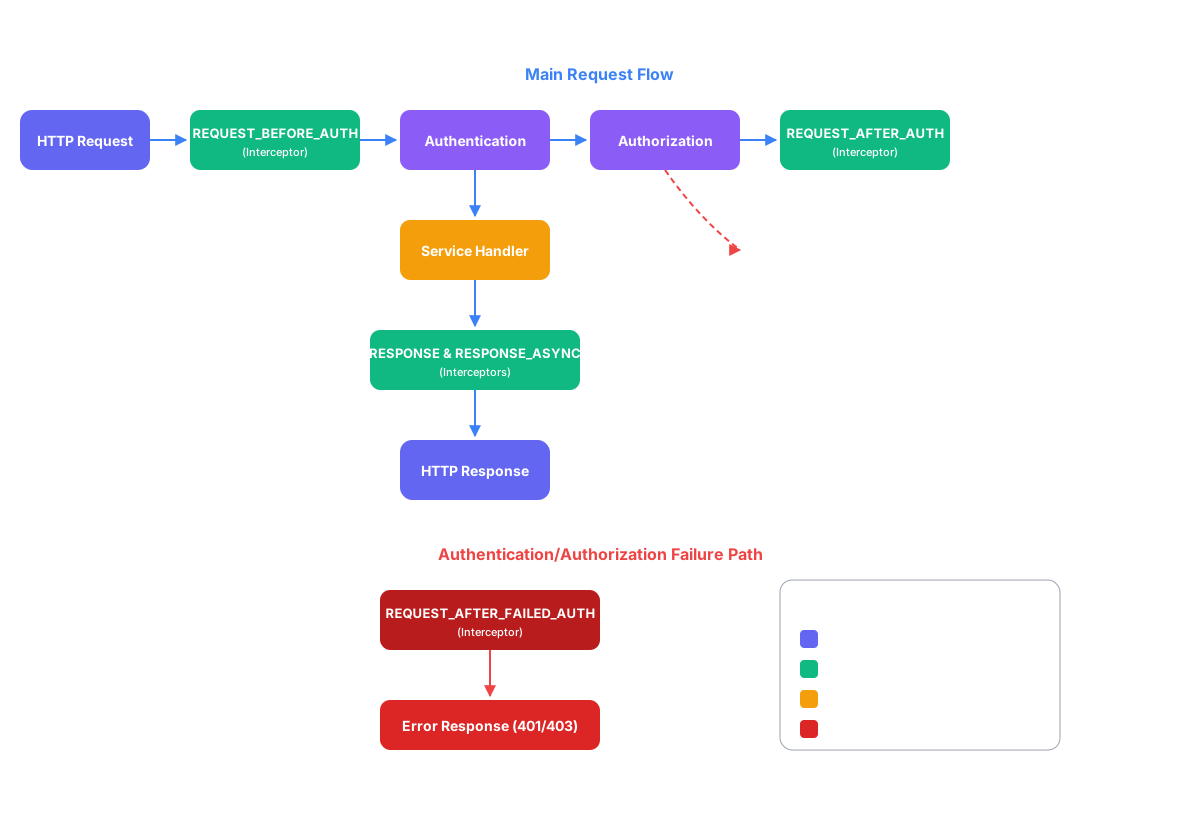
The diagram below shows where each interceptor point fits in the request pipeline. Green boxes are the points at which interceptors can run; the main request flow (blue) passes through them in order, and the red branch covers requests that fail authentication or authorization.
The Interceptor Class
An Interceptor is comprised of a class implementing one of the Interceptor interfaces, such as MongoInterceptor, and annotated with @RegisterPlugin.
The Interceptor interface encompasses two pivotal methods: handle(req, res) and resolve(req, res). The paramount method is handle(req, res), which is triggered only when resolve(req, res) evaluates to true. This design ensures that the interceptor’s logic is selectively applied, allowing developers to execute customized actions precisely when conditions specified in the resolve() method are met.
The req and res arguments allow you to retrieve and modify the content, query parameters, and headers of both the request and response objects.
The special interceptor interface, WildcardInterceptor, intercepts requests handled by any Service. Other interceptors can handle requests with matching types between the Service and the Interceptor:
-
WildcardInterceptor: Intercepts requests handled by any service -
ByteArrayInterceptor: Intercepts requests handled by services implementingByteArrayService -
JsonInterceptor: Intercepts requests handled by services implementingJsonService -
BsonInterceptor: Intercepts requests handled by services implementingBsonService -
MongoInterceptor: Intercepts requests handled by theMongoService -
GraphQLInterceptor: Intercepts GraphQL requests (available since RESTHeart v7) -
ProxyInterceptor: Intercepts proxied requests
|
Note
|
MongoInterceptor is particularly useful as it allows intercepting requests to the MongoService, adding logic to its data API. For instance, the following response interceptor removes the property secret from GET /coll.
|
|
Note
|
GraphQLInterceptor became available in RESTHeart v7 when GraphQLRequest was moved to restheart-commons, enabling plugin developers to intercept and modify GraphQL requests and responses. This allows implementing custom logic such as query validation, result transformation, or access logging for GraphQL operations.
|
@RegisterPlugin(name = "secretFilter",
    interceptPoint = InterceptPoint.RESPONSE,
    description = "removes the property 'secret' from GET /coll")
public class ReadOnlyPropFilter implements MongoInterceptor {
    @Override
    public void handle(MongoRequest request, MongoResponse response) throws Exception {
        if (response.getContent().isDocument()) {
            response.getContent().asDocument().remove("secret");
        } else if (request.getContent().isArray()) {
            response.getContent().asArray().stream()
                .map(doc -> doc.asDocument())
                .forEach(doc -> doc.remove("secret"));
        }
    }

    @Override
    public boolean resolve(MongoRequest request, MongoResponse response) {
        return request.isGet()
            && response.getContent() != null
            && "coll".equalsIgnoreCase(request.getCollectionName());
    }
}
@RegisterPlugin Annotation
All plugins, including Interceptors, must be annotated with @RegisterPlugin. This annotation serves two primary purposes:
-
Discovery: Allows RESTHeart to discover plugin implementation classes in deployed JARs (see How to Deploy Plugins).
-
Configuration: Specifies parameters such as the URI of a service or the intercept point of an interceptor.
Example:
@RegisterPlugin(name = "foo",
    description = "just an example service",
    defaultUri="/foo",      // optional, default /<service-name>
    secure=false,           // optional, default false
    enabledByDefault=false) // optional, default true
public class MyPlugin implements JsonService {
...
}
Annotation Parameters:
| param | description | mandatory | default value |
|---|---|---|---|
|
the name of the Interceptor |
yes |
none |
|
description of the Interceptor |
yes |
none |
|
|
no |
|
|
the intercept point: |
no |
|
|
Only used by Interceptors of proxied resources (the content is always available to Interceptor of Services) Set it to |
no |
|
|
the execution priority (less is higher priority) |
no |
|
Intercept Point Note: REQUEST_BEFORE_EXCHANGE_INIT
An interceptor using this intercept point will handle requests before the exchange initialization occurs. Such interceptors must implement the WildcardInterceptor interface, ensuring that the Interceptor.handle(request, response) method receives both UninitializedRequest and UninitializedResponse objects.
Additionally, interceptors at this stage may:
-
Provide a custom initializer for requests by using
PluginUtils.attachCustomRequestInitializer(). -
Modify the raw content of the request using
Request.setRawContent().
This setup allows for preliminary modifications and configurations to be applied to requests at an early stage in the processing pipeline.
Transforming Request Content Format
Interceptors at REQUEST_BEFORE_EXCHANGE_INIT can inspect and modify the request before it is initialized. The handle(req, res) and resolve(req, res) methods receive the request as UninitializedRequest and the response as UninitializedResponse. This is particularly useful for transforming request content formats.
Example:
@RegisterPlugin(name = "xmlToBsonTransformer",
    interceptPoint = InterceptPoint.REQUEST_BEFORE_EXCHANGE_INIT,
    description = "transforms XML request to Bson for MongoService")
public class XmlToBsonTransformer implements WildcardInterceptor {
    @Override
    public void handle(UninitializedRequest req, UninitializedResponse res) throws Exception {
        // Transforming XML to Bson
    }

    @Override
    public boolean resolve(UninitializedRequest req, UninitializedResponse res) {
        // Logic to determine when to apply the transformer
    }
}|
Important
|
Only WildcardInterceptor can use the REQUEST_BEFORE_EXCHANGE_INIT intercept point.
|
For a practical example of transforming request and response content to and from a different format than expected by a service, refer to the protobuffer-contacts example.
Undoing a Write at RESPONSE Time (v9.9)
Some checks cannot run before the write. A PATCH carrying update operators has no resulting document to inspect until it has been applied, so the check belongs at RESPONSE — and it needs a way to take the write back.
A MongoInterceptor declares that intent at request time and undoes the write at response time:
| Call | When | Meaning |
|---|---|---|
|
a REQUEST intercept point |
this request may need to be undone. Idempotent. |
|
|
undo this request’s write. |
startTxn() must be called before the write: a transaction cannot be opened around something that already happened. Since the decision is taken on the shape of the request rather than on its outcome, it is conservative — a transaction is opened whenever an undo might be needed, and most commit with nothing to undo.
You never commit. The transaction is committed for you once every RESPONSE interceptor has run, unless one of them called rollback().
A plugin registers at one intercept point, so the pair is two classes:
@RegisterPlugin(name = "orderTotalsTxn",
    description = "runs in a transaction the writes orderTotals checks",
    interceptPoint = InterceptPoint.REQUEST_AFTER_AUTH)
public class OrderTotalsTxn implements MongoInterceptor {
    @Override
    public void handle(MongoRequest request, MongoResponse response) {
        request.startTxn();
    }

    @Override
    public boolean resolve(MongoRequest request, MongoResponse response) {
        return request.isPatch() && "orders".equals(request.getCollectionName());
    }
}@RegisterPlugin(name = "orderTotals",
description = "refuses an order whose total does not match its items",
interceptPoint = InterceptPoint.RESPONSE)
public class OrderTotals implements MongoInterceptor {
@Inject("mclient")
private MongoClient mclient;
@Override
public void handle(MongoRequest request, MongoResponse response) throws Exception {
var order = response.getDbOperationResult().getNewData();
if (!totalMatchesItems(order)) {
response.setInError(HttpStatus.SC_BAD_REQUEST, "total does not match the items");
response.rollback(mclient);
}
}
@Override
public boolean resolve(MongoRequest request, MongoResponse response) {
return request.isPatch()
&& "orders".equals(request.getCollectionName())
&& response.getDbOperationResult() != null
&& response.getDbOperationResult().getHttpCode() < 300;
}
}What rollback() actually does
On a replica set the write ran in a transaction, and rollback() marks it for abort — it does not undo anything on the spot, because a later interceptor would then be working on a dead session. The abort happens after the last RESPONSE interceptor. Nothing was committed, so nothing was ever visible and no change stream event was emitted.
Without a replica set startTxn() is a no-op and rollback() falls back to a compensating write: the original document is restored for an update, the new one deleted for an insert. Know its limits — the compensating write is guarded by the ETag the write produced, so a concurrent change to the same document in the meantime leaves the refused write in place; the document is visible to readers and to change streams while it lasts; and bulk writes are not supported at all.
The active mode is logged at startup.
Inside a client transaction
A request may already be running in a client-driven transaction (?sid=&txn=). MongoDB has no nested transactions, so startTxn() joins that one, and rollback() aborts the client’s whole transaction, not just this write. That is deliberate: leaving a refused document in an uncommitted transaction the client can still commit would defeat the check that refused it.
A worked example in RESTHeart itself
jsonSchemaAfterWrite is built exactly this way — see JSON Schema validation.
Handling Failed Authentication (v9)
RESTHeart v9 introduces the REQUEST_AFTER_FAILED_AUTH intercept point, which executes when authentication or authorization fails. This enables custom handling for failed security attempts before the error response is sent to the client.
Use Cases
-
Brute Force Protection: Detect and respond to repeated failed authentication attempts
-
Custom Error Responses: Provide user-friendly error messages for auth failures
-
Security Event Logging: Track and log authentication failures for audit and security monitoring
-
Rate Limiting: Implement rate limiting based on failed authentication attempts
-
Account Lockout: Temporarily lock accounts after multiple failed attempts
Example: Logging Failed Authentication
@RegisterPlugin(
    name = "failedAuthLogger",
    description = "Logs failed authentication and authorization attempts",
    interceptPoint = InterceptPoint.REQUEST_AFTER_FAILED_AUTH,
    enabledByDefault = true)
public class FailedAuthLoggerInterceptor implements WildcardInterceptor {

    private static final Logger LOGGER = LoggerFactory.getLogger(FailedAuthLoggerInterceptor.class);

    @Override
    public void handle(Request<?> request, Response<?> response) throws Exception {
        var account = request.getAuthenticatedAccount();
        var clientIp = request.getRemoteAddress();
        var path = request.getPath();

        if (account == null) {
            // Authentication failed - no valid credentials provided
            LOGGER.warn("Authentication failed from IP: {} attempting to access: {}",
                clientIp, path);
        } else {
            // Authorization failed - valid credentials but insufficient permissions
            LOGGER.warn("Authorization failed for user: {} from IP: {} attempting to access: {}",
                account.getPrincipal(), clientIp, path);
        }
    }

    @Override
    public boolean resolve(Request<?> request, Response<?> response) {
        return true; // Intercept all failed auth attempts
    }
}
Example: Brute Force Protection
@RegisterPlugin(
    name = "bruteForceProtection",
    description = "Detects and blocks brute force attacks",
    interceptPoint = InterceptPoint.REQUEST_AFTER_FAILED_AUTH,
    enabledByDefault = true)
public class BruteForceProtectionInterceptor implements WildcardInterceptor {

    private static final Logger LOGGER = LoggerFactory.getLogger(BruteForceProtectionInterceptor.class);

    // Track failed attempts per IP
    private final LoadingCache<String, AtomicInteger> failedAttempts = Caffeine.newBuilder()
        .expireAfterWrite(15, TimeUnit.MINUTES)
        .build(key -> new AtomicInteger(0));

    private static final int MAX_ATTEMPTS = 5;
    private static final int LOCKOUT_MINUTES = 15;

    @Override
    public void handle(Request<?> request, Response<?> response) throws Exception {
        var clientIp = request.getRemoteAddress();
        var attempts = failedAttempts.get(clientIp);
        int failedCount = attempts.incrementAndGet();

        if (failedCount >= MAX_ATTEMPTS) {
            LOGGER.error("Brute force attack detected from IP: {}. {} failed attempts. " +
                "Access blocked for {} minutes.",
                clientIp, failedCount, LOCKOUT_MINUTES);

            // Optionally: modify response to indicate account lockout
            response.setStatusCode(429); // Too Many Requests
            response.setContent(BsonDocument.parse(
                "{\"error\": \"Too many failed authentication attempts. " +
                "Account temporarily locked.\"}"
            ));
        } else {
            LOGGER.warn("Failed authentication from IP: {}. Attempt {}/{}",
                clientIp, failedCount, MAX_ATTEMPTS);
        }
    }

    @Override
    public boolean resolve(Request<?> request, Response<?> response) {
        // Only trigger for authentication failures (not authorization)
        return request.getAuthenticatedAccount() == null;
    }
}
Example: Custom Error Response
@RegisterPlugin(
    name = "friendlyAuthErrorResponder",
    description = "Provides user-friendly error messages for auth failures",
    interceptPoint = InterceptPoint.REQUEST_AFTER_FAILED_AUTH,
    enabledByDefault = true)
public class FriendlyAuthErrorInterceptor implements WildcardInterceptor {

    @Override
    public void handle(Request<?> request, Response<?> response) throws Exception {
        var account = request.getAuthenticatedAccount();

        BsonDocument errorResponse;

        if (account == null) {
            // Authentication failed
            errorResponse = BsonDocument.parse("""
                {
                    "error": "Invalid username or password",
                    "code": "AUTH_FAILED",
                    "message": "Please check your credentials and try again."
                }
                """);
        } else {
            // Authorization failed
            errorResponse = BsonDocument.parse("""
                {
                    "error": "Access denied",
                    "code": "INSUFFICIENT_PERMISSIONS",
                    "message": "You do not have permission to access this resource.",
                    "requiredRole": "admin"
                }
                """);
        }

        response.setContent(errorResponse);
    }

    @Override
    public boolean resolve(Request<?> request, Response<?> response) {
        return true; // Apply to all failed auth attempts
    }
}
Key Characteristics
-
Execution Timing: Runs after authentication/authorization fails but before the error response is sent to the client
-
Access to Failure Context: Can distinguish between authentication failures (
account == null) and authorization failures (account != null) -
Response Modification: Can modify the error response status code and body
-
Request Information: Full access to request details (IP address, path, headers, etc.)
Integration with Existing Security
This intercept point works seamlessly with RESTHeart’s existing security infrastructure:
-
Compatible with all authentication mechanisms (Basic Auth, JWT, custom)
-
Works with all authorizers (File ACL, MongoDB ACL, custom)
-
Integrates with the security audit trail
-
No impact on successful authentication/authorization flows
|
Important
|
Only WildcardInterceptor can use the REQUEST_AFTER_FAILED_AUTH intercept point, as it needs to handle requests regardless of their specific type.
|