Introduction to RESTHeart
RESTHeart CloudWhat is RESTHeart?
RESTHeart is a backend for web, mobile, AI and IoT apps. It gives an application the backend it would otherwise have to write:
-
AI: an MCP server, so AI agents use the application’s APIs under the same permissions as its users; vector search, with embeddings computed on write (Voyage AI, any OpenAI-compatible endpoint, Ollama), uploaded documents chunked for retrieval, and results re-ranked — the pieces of RAG, on the data the application already has;
-
accounts: sign-up, login, email verification, password reset, team invitations, Google sign-in, tokens and API keys;
-
permissions per role, down to the documents a user may read or change;
-
data on MongoDB through REST, GraphQL, WebSocket and SSE, with JSON Schema validation;
-
live data: changes pushed to clients as they happen;
-
email: transactional messages from templates, over your own SMTP;
-
payments with Stripe;
-
IoT: an MQTT bridge for devices.
All of it is configuration, not code. What an application needs beyond it goes into plugins, in Java, Kotlin, JavaScript or TypeScript.
RESTHeart can be used in two ways, and most applications use both.
RESTHeart as a Ready-to-Use Platform
Everything listed above works out of the box, configured rather than coded: an application can be built with HTTP requests and configuration alone.
RESTHeart as an HTTP Framework
RESTHeart is also a framework for the services configuration cannot express, on Java 25, virtual threads and GraalVM native images:
-
plugins in Java, Kotlin, JavaScript or TypeScript;
-
four building blocks: Services, Interceptors, Providers, Initializers;
-
dependency injection;
-
each request on its own virtual thread, so plugin code is plain blocking code;
-
startup in about 100 milliseconds.
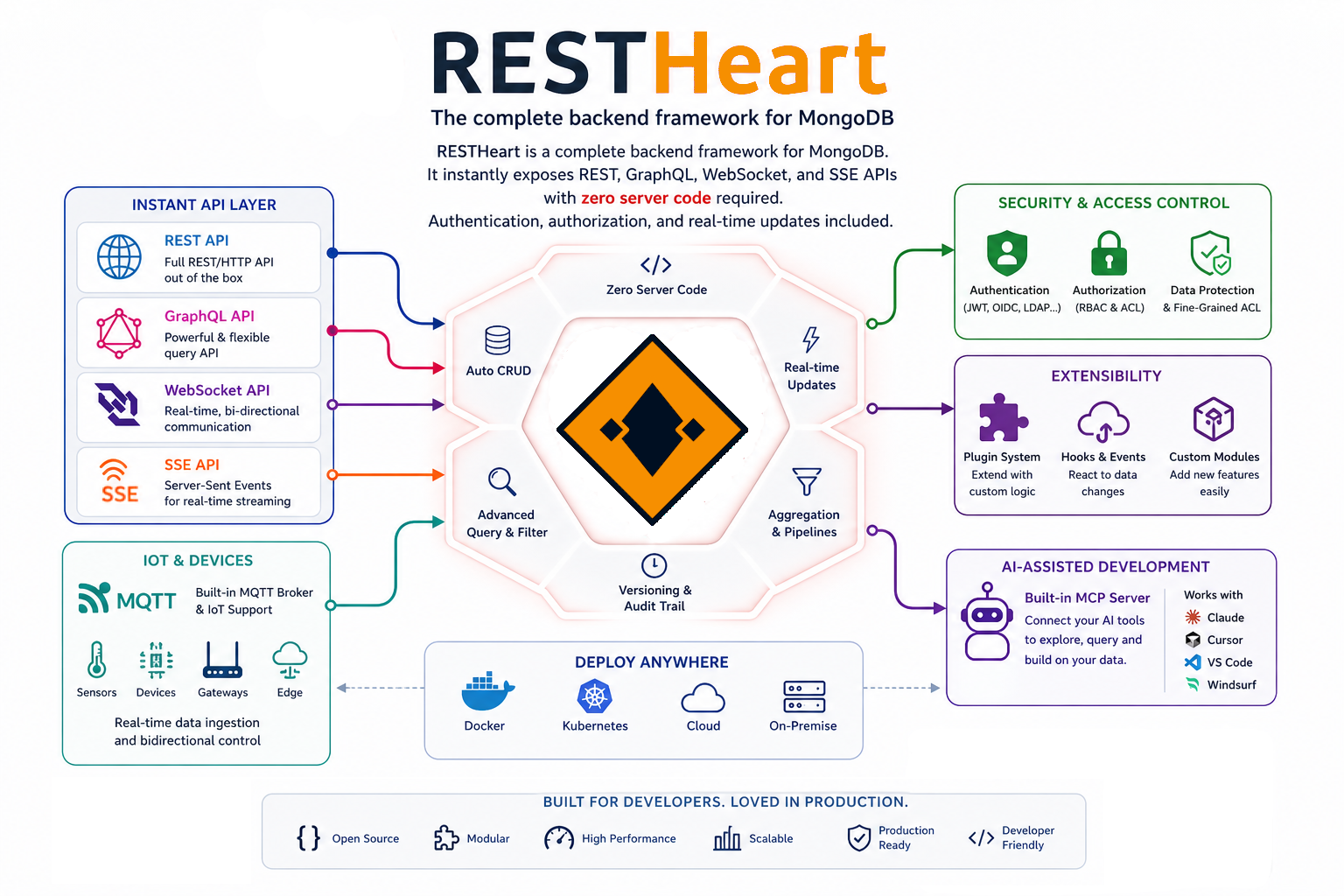
RESTHeart features set
How RESTHeart Works
Architecture
RESTHeart consists of:
-
restheart-core: the runtime. It reads the configuration, registers the plugins, enforces the security policies, routes each request to its service and runs the interceptors.
-
Standard plugins, in the
pluginsdirectory:
plugins
├── lib/                                # plugin dependencies
├── restheart-accounts.jar              # sign-up, login, teams, password reset
├── restheart-ai.jar                    # MCP server, vector search, embeddings, reranking
├── restheart-emails.jar                # transactional email over SMTP
├── restheart-graphql.jar               # GraphQL API
├── restheart-metrics.jar               # metrics and monitoring
├── restheart-mongoclient-provider.jar  # MongoDB connection
├── restheart-mongodb.jar               # REST, WebSocket and SSE APIs for MongoDB
├── restheart-polyglot.jar              # JavaScript and TypeScript plugins
├── restheart-security.jar              # authentication and authorization
└── restheart-stripe.jar                # payments with Stripe
The MQTT bridge is a separate module, installed into an instance rather than shipped with it: see IoT / MQTT.
-
Your plugins, optional: JAR files, or directories of JavaScript.
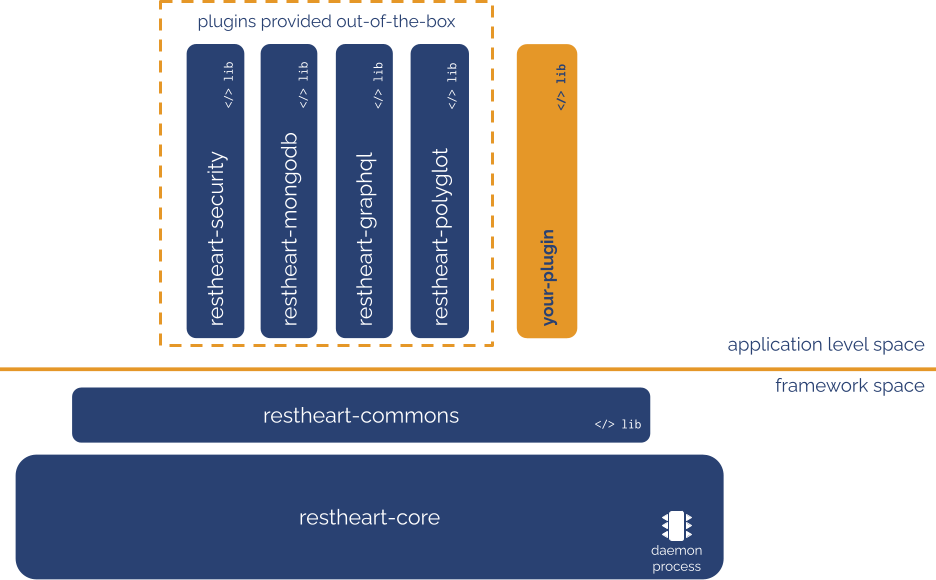
RESTHeart modular architecture
What to Build with It
A web or mobile app
An AI app
Agents that use the application’s APIs through MCP, under the same permissions as its users; retrieval over the application’s own data with vector search, embeddings computed on write, documents chunked and results re-ranked.
An IoT app
Device messages from an MQTT broker, turned into MongoDB documents, REST responses or Server-Sent Events: see IoT / MQTT.
Custom services
What configuration cannot express — a third-party integration, a computation, a workflow — goes into plugins, next to everything above.
Why RESTHeart?
Out of the box
Most applications need what the list at the top of this page gives: accounts, permissions, data and live updates, often email and payments, now AI too. With RESTHeart that is a running instance and its configuration, not code.
|
Tip
|
See it with a starter app: sign-up, login, teams and data, with no backend code. Clone it, point it at a free Ulabase service, run it. |
Virtual threads
Every request runs on its own virtual thread. Plugin code is written as plain blocking code, with no callbacks or reactive types, and a blocked request does not hold a platform thread.
Plugins when you need them
Hello World in Java:
@RegisterPlugin(name = "greetings", description = "just another Hello World")
public class GreeterService implements JsonService {
    @Override
    public void handle(JsonRequest request, JsonResponse response) {
        response.setContent(object().put("message", "Hello World!"));
    }
}
Hello World in JavaScript:
export const options = { name: "greetings", description: "just another Hello World" }

export function handle(request, response) {
    response.setContent(JSON.stringify({ msg: 'Hello World' }));
    response.setContentTypeAsJson();
}|
Note
|
JavaScript plugins are plain synchronous code: no async/await, promises or callbacks. |
What Makes RESTHeart Different?
RESTHeart is comparable to frameworks such as Undertow (which it uses internally), Vert.x, Quarkus, Spring Boot and Node.js. The difference is that it includes the application’s backend, not only the primitives to write one:
-
with other frameworks you implement accounts, permissions, data APIs, payments and the AI integration yourself;
-
with RESTHeart they are there, configured, and you write code only for what is specific to your application.
Deployment Options
-
Standalone JAR:
java -jar restheart.jar -
Docker:
docker run softinstigate/restheart -
Kubernetes: standard manifests, or the Helm chart
-
GraalVM native: a native binary, instant startup
-
Cloud platforms: AWS, GCP, Azure
-
Ulabase: fully managed, at ulabase.com
Licensing
RESTHeart is dual-licensed:
-
AGPL: free and open source, with no feature restrictions;
-
Enterprise License: for closed-source products.
What’s Next?
Ready to get started?
Or continue reading:
-
Installation Guide - Detailed setup instructions
-
Core Concepts - Understanding RESTHeart’s architecture
-
Security Fundamentals - How security works