MQTT Overview
RESTHeartPreview
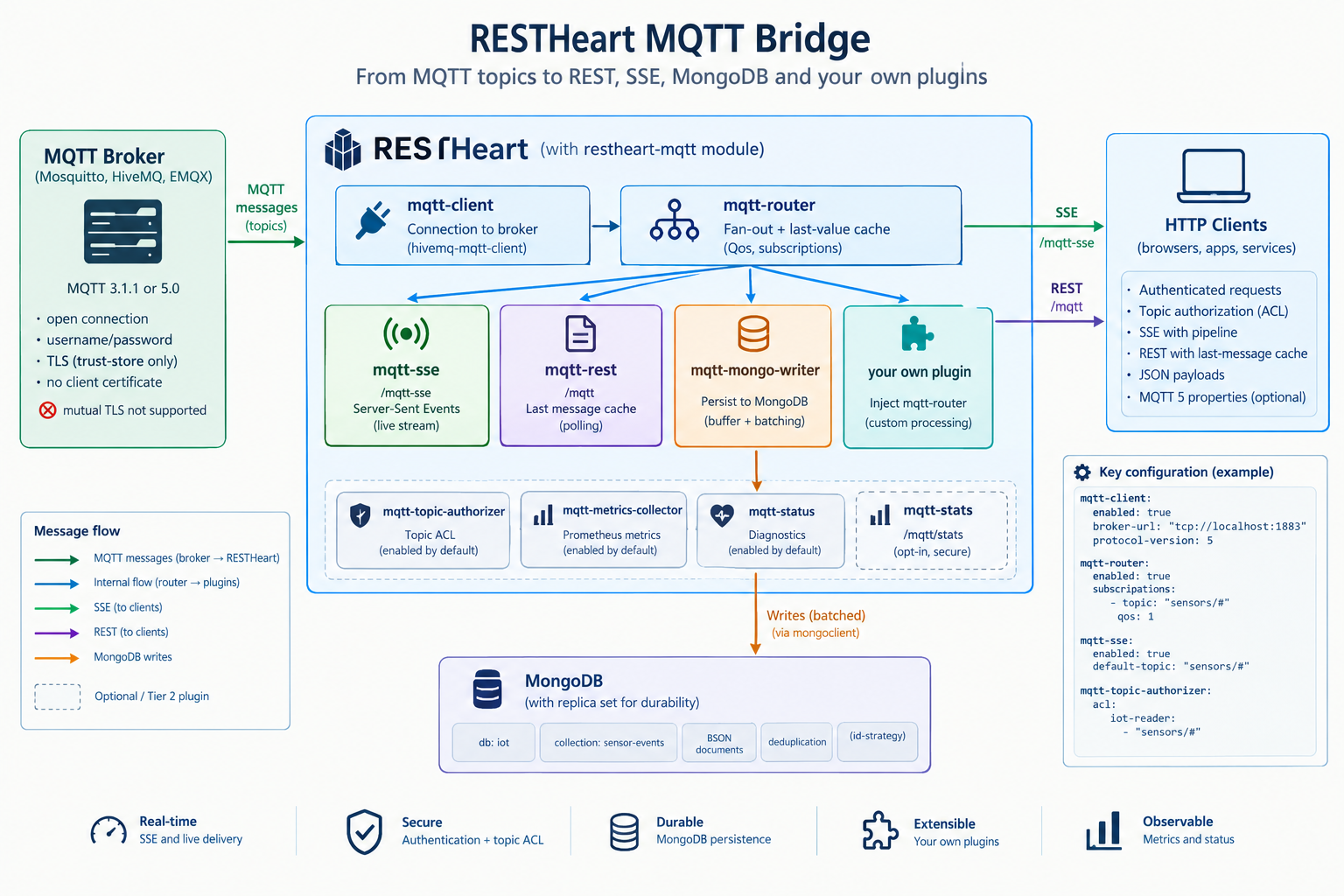
The restheart-mqtt module bridges an external MQTT broker into RESTHeart: incoming topic messages become Server-Sent Events, REST responses, MongoDB documents, or input to your own plugins.
It connects to any MQTT 3.1.1 or 5.0 broker — Mosquitto, HiveMQ, EMQX — using hivemq-mqtt-client 1.4.0, and exposes what it receives through ordinary RESTHeart plugins.
|
Note
|
Brokers that require mutual TLS with a client certificate — AWS IoT Core among them — are not supported. The module exposes only trust-store settings (tls, tls-trust-store, tls-trust-store-password), never a key store or a client certificate.
|
Not bundled
restheart-mqtt does not ship with RESTHeart. It is installed separately — see Installing below.
This is deliberate. MQTT is far from RESTHeart’s habitual use cases, and hivemq-mqtt-client brings 13 transitive jars including RxJava and seven Netty modules: a second network stack and reactive runtime that exists nowhere else in a product built on Undertow/XNIO. Bundling it would add all of that to every RESTHeart installation, including the ones that never touch MQTT.
The module still lives in the RESTHeart monorepo, and its integration tests run against the core built alongside it.
What you get
| Plugin | Kind | Default URI | Enabled by default |
|---|---|---|---|
|
|
— |
No (Tier 1, the module switch) |
|
|
— |
No (gated explicitly, see below) |
|
|
— |
Yes (connects the client, last of all) |
|
|
|
No (Tier 2) |
|
|
|
No (Tier 2) |
|
|
— |
Yes (deliberately, fails closed) |
|
|
— |
No (Tier 2) |
|
|
— |
Yes (registers the router’s gauges) |
|
|
|
No (Tier 2) |
|
|
— |
Yes (diagnostic sentinel) |
How the pieces fit together:
flowchart LR
    broker[("MQTT broker")]
    mongo[("MongoDB")]
    callers(["HTTP clients"])

    subgraph rh["RESTHeart"]
        direction TB
        connector["<b>mqtt-connector</b><br><i>connects last, once every consumer exists</i>"]
        client["<b>mqtt-client</b><br><i>the broker connection</i>"]
        router["<b>mqtt-router</b><br><i>covering subscriptions, fan-out,<br>last-value cache</i>"]
        authz["<b>mqtt-topic-authorizer</b><br><i>per-topic ACL, fails closed</i>"]
        sse["<b>mqtt-sse</b><br><code>/mqtt-sse</code>"]
        rest["<b>mqtt-rest</b><br><code>/mqtt</code>"]
        writer["<b>mqtt-mongo-writer</b><br><i>durable listener</i>"]
        own["<i>your own plugin</i>"]
    end

    connector -.-> client
    broker ==> client
    client ==> router
    router --> sse
    router --> rest
    router --> writer
    router --> own
    writer --> mongo
    writer -.->|"acknowledged once buffered"| broker
    callers --> authz
    authz --> sse
    authz --> rest
mqtt-sse and mqtt-rest are both registered with secure = true: they require authentication, and mqtt-topic-authorizer then checks the requested topic filter against the ACL before either service sees the request.
Messages reach mqtt-mongo-writer through a durable listener, which acknowledges the broker once a message is in its buffer, on its way to MongoDB. See Durability and Operations for what that guarantees and what it does not.
Enablement
The module is dormant on installation, in two tiers.
Tier 1 — the module switch
mqtt-client is registered with enabledByDefault = false. Nothing else in the module can do anything until it is armed:
mqtt-client:
  enabled: true
  broker-url: "tcp://broker:1883"
mqtt-router is registered with enabledByDefault = false too, and is enabled together with mqtt-client. It is not left to ProvidersChecker to follow the injection graph and switch it off on its own. ProvidersChecker does drop mqtt-router quietly when mqtt-client is disabled — the provider’s descriptor is still there, so it takes the "the provider is disabled" branch and logs at DEBUG. But dropping it makes mqtt-router absent from the set of valid providers, and every enabled plugin injecting it then hits the "no provider found" branch, at ERROR. mqtt-metrics-collector is enabledByDefault = true and injects mqtt-router, so an mqtt-router left enabled over a disabled mqtt-client produces an ERROR line on every startup for it, and one more for each Tier 2 plugin still switched on.
Enabling mqtt-client without mqtt-router leaves the module with no message routing, so enable both.
Tier 2 — opt-in surfaces
Arming Tier 1 alone exposes no HTTP endpoint. mqtt-sse, mqtt-rest, mqtt-mongo-writer and mqtt-stats are each independently registered with enabledByDefault = false, and are switched on one at a time as needed:
mqtt-sse:
  enabled: true

mqtt-rest:
  enabled: true

mqtt-mongo-writer:
  enabled: true

mqtt-stats:
  enabled: true
The authorizer stays on
mqtt-topic-authorizer stays enabled by default, regardless of the two tiers above, deliberately, not as an oversight. While every Tier 2 endpoint is off, the authorizer is simply never invoked and costs nothing. The moment one is turned on, the authorizer is already active and fails closed with no ACL configured, so a Tier 2 endpoint can never be reachable without topic authorization already in force — not even for a moment, and not even because an operator forgot a flag.
Four realistic configurations
Provider only
Inject mqtt-router from your own plugin, with no HTTP endpoint exposed at all:
flowchart LR
broker[("MQTT broker")] ==> client["<b>mqtt-client</b>"] ==> router["<b>mqtt-router</b>"] --> own["<i>your plugin</i><br>injects mqtt-router"]mqtt-client:
enabled: true
broker-url: "tcp://broker:1883"
mqtt-router:
enabled: trueA worked example is in examples/mqtt-logger.
Live SSE
sequenceDiagram
    autonumber
    participant C as HTTP client
    participant A as mqtt-topic-authorizer
    participant S as mqtt-sse
    participant R as mqtt-router
    participant B as MQTT broker

    C->>A: GET /mqtt-sse?topic=sensors/%23
    Note over A: REQUEST_AFTER_AUTH<br>checks the topic filter against the ACL
    alt filter not granted
        A-->>C: 403, never reaches the router
    else filter granted
        A->>S: request continues
        S->>R: subscribe(filter, qos, listener)
        R->>B: SUBSCRIBE, unless an existing subscription already covers the filter
        S-->>C: 200, text/event-stream held open
        B->>R: message on the topic
        R->>S: listener invoked
        S-->>C: event: mqtt-message
endmqtt-client:
enabled: true
broker-url: "tcp://broker:1883"
mqtt-router:
enabled: true
mqtt-sse:
enabled: true
default-topic: "sensors/#"
mqtt-topic-authorizer:
acl:
iot-reader:
- "sensors/#"REST polling
mqtt-rest only ever answers from the router’s last-message cache, so something has to prime it:
flowchart LR
    broker[("MQTT broker")] ==> client["<b>mqtt-client</b>"] ==> router["<b>mqtt-router</b>"]
    router --> cache[("last-message cache<br><i>in memory</i>")]
    caller(["HTTP client"]) -->|"GET /mqtt?topic=..."| rest["<b>mqtt-rest</b>"]
    rest --> cache
rest -.->|"200 with the last message<br>404 if nothing cached yet"| callermqtt-client:
enabled: true
broker-url: "tcp://broker:1883"
mqtt-router:
enabled: true
last-message-cache: true
subscriptions:
- topic: "sensors/#"
qos: 1
mqtt-rest:
enabled: true
mqtt-topic-authorizer:
acl:
iot-reader:
- "sensors/#"MongoDB persistence
flowchart LR
    broker[("MQTT broker")] ==> client["<b>mqtt-client</b>"] ==> router["<b>mqtt-router</b>"]
    router -->|"durable listener"| writer["<b>mqtt-mongo-writer</b>"]
    writer --> buffer["buffer<br><i>bounded by capacity and max-bytes;<br>waits for room when full</i>"]
    buffer -->|"drain loop, batched"| mongo[("MongoDB<br><i>db.collection per sink</i>")]
    mongo -.->|"documents MongoDB refuses,<br>after drain.max-retries"| dlq[("dead-letter<br>collection")]
writer -.->|"acknowledges each message<br>once buffered"| brokermqtt-client:
enabled: true
broker-url: "tcp://broker:1883"
mqtt-router:
enabled: true
mqtt-mongo-writer:
enabled: true
mongo-sink:
- topic: "sensors/#"
database: "iot"
collection: "sensor-events"This last one also needs the mongoclient module configured and connected: mqtt-mongo-writer injects mclient rather than opening its own connection.
Installing
The module is distributed as an archive containing the plugin, its runtime dependencies, a sample configuration and both licences. Download the latest build from master and unpack it into your instance’s plugins directory:
curl -LO https://github.com/SoftInstigate/restheart/releases/download/mqtt-snapshot/restheart-mqtt-10.0.0-SNAPSHOT.zip
unzip restheart-mqtt-10.0.0-SNAPSHOT.zip -d /opt/restheart/plugins/
That archive is published by the module’s GitHub Actions workflow on every push to master, and only after its integration tests have passed against the core built alongside it. The release notes record which commit each build came from.
To build it yourself instead — necessarily, if you are working on the module:
./mvnw -pl mqtt -am package
unzip mqtt/target/restheart-mqtt-<version>.zip -d /opt/restheart/plugins/
Either way you get:
plugins/restheart-mqtt-<version>/
├── restheart-mqtt.jar
├── lib/                              hivemq-mqtt-client and its 13 transitives
├── restheart-mqtt-default-config.yml
├── LICENSE.txt
└── COMM-LICENSE.txt
The version directory is deliberate, not an accident of packaging. PluginsScanner scans the plugins directory two levels deep and treats any lib path segment as classpath-only, never scanning it for plugins, so both the jar and its dependencies are picked up from there. Keeping lib/ inside the module’s own directory rather than merging it into the shared plugins/lib is what stops this module’s Netty and RxJava from mixing with other plugins' dependencies.
Then copy the settings you need from restheart-mqtt-default-config.yml into your instance’s configuration, and enable at least mqtt-client and mqtt-router.
Install into a build from master, not into a release
The archive is a 10.0.0-SNAPSHOT build and has only been tested against the core built alongside it; softinstigate/restheart-snapshot:latest is that core as a Docker image.
There is also a specific security reason. Per-topic authorization on /mqtt-sse needs RESTHeart to run the SSE handshake through WildcardInterceptor`s (`SseWildcardInterceptorsExecutor), and no release includes that yet: 9.8.1 and every earlier version lack it. It is on the unreleased master and 9.x branches.
|
Warning
|
On a RESTHeart without that fix, mqtt-topic-authorizer resolves but is never invoked on /mqtt-sse, so the endpoint is authenticated but not authorized per topic — a topic outside the ACL is silently accepted instead of rejected with 403.
|
Quick start
mqtt-client:
  enabled: true
  broker-url: "tcp://localhost:1883"
  protocol-version: 5

mqtt-router:
  enabled: true
  subscriptions:
    - topic: "sensors/#"
      qos: 1

mqtt-sse:
  enabled: true
  default-topic: "sensors/#"

mqtt-rest:
  enabled: true

mqtt-topic-authorizer:
  acl:
    admin:
      - "sensors/#"
Then:
curl -N -u admin:secret 'http://localhost:8080/mqtt-sse?topic=sensors/temp'
curl -u admin:secret 'http://localhost:8080/mqtt?topic=sensors/temp'
For a guided walkthrough that starts from a self-contained Docker environment, follow the MQTT Tutorial.
Using the client from your own plugin
Inject mqtt-router to subscribe to topics:
@RegisterPlugin(name = "my-service", description = "...", defaultURI = "/my-service")
public class MyService implements JsonService {
    @Inject("mqtt-router")
    private MqttMessageRouter router;

    @OnInit
    public void onInit() {
        router.subscribe("sensors/#", Qos.AT_LEAST_ONCE, msg ->
            LOGGER.info("{} -> {}", msg.getTopic(), msg.getPayload()));
    }
}
The router’s API is expressed entirely in this module’s own types (Qos, MqttMessage), so a plugin that only uses the router does not compile against HiveMQ at all. Inject mqtt-client instead when you deliberately want the raw HiveMQ client — to publish, or to reach protocol features the router does not expose.
subscribe registers a live listener: it never holds up an acknowledgement to the broker, and it is subject to max-inflight-messages-per-second. If your plugin stores messages and must not lose them, use subscribeDurable instead. Its listener receives the message and a taken callback to run once the message is safely stored; the router acknowledges the broker only after every durable listener has done so, and a message none of them took is redelivered after a crash.
|
Caution
|
Call taken exactly once, and do call it. An unacknowledged message occupies a slot in the broker’s in-flight window, so a listener that never calls back eventually stalls delivery to this client altogether.
|
Call unsubscribe or unsubscribeDurable when you are done. A listener that is never removed keeps being called, and keeps its filter subscribed on the broker.
Reporting bugs
Open an issue at SoftInstigate/restheart/issues. Almost every surprise in this module turns out to be a configuration one, so these make a report actionable:
-
the configuration of the
mqtt-*blocks, or theRHOyou ran with, with passwords removed; -
the
mqtt-statusoutput from the startup log: themqtt module active: … inactive: …line, or the warnings printed in its place; -
the RESTHeart build you installed into — a snapshot image tag, a commit, or a release version — and the module’s build, which the
mqtt-snapshotrelease notes record; -
the protocol details:
protocol-version, the QoS the publisher used (mosquitto_pubdefaults to0), and the broker and its version; -
the server log from startup to the failure, not only the error.
And if the documentation let you configure something wrongly without complaining, report that too: it is a bug in the docs.
License
Dual-licensed, like every other RESTHeart module: AGPL-3.0, or the RESTHeart COMMERCIAL LICENSE for those who need it.